Crypto Phishing Scams: Detection and Response Guide
“Don't click suspicious links” is useful advice, but it no longer describes the whole crypto phishing problem. A victim may never enter a password into a fake login page. They may connect a wallet to a convincing dApp, approve a token permission, or sign a transaction that looks like a routine mint. The result can be a direct path to the assets in that wallet.
Modern crypto phishing scams exploit trust at the moment a user interacts with a wallet. The attacker may arrive through a search advert, a Telegram message, a compromised social account, or a fake support conversation. The key question is no longer only, “Is this link real?” It's also, “What exactly am I authorising?”
Understanding the Modern Crypto Phishing Threat
Traditional phishing tries to steal information, such as an exchange password, an email login, or a wallet seed phrase. Crypto attackers still use those methods, but blockchain transactions give them another route. Instead of taking your credentials and logging in later, they can persuade you to use your own wallet to authorise the theft.
That technique is often called approval phishing. A scam site may present a claim, swap, staking action, or NFT mint. The wallet prompt might contain technical language that looks unfamiliar, so the user confirms it without understanding the permission. The signature can allow a contract or another address to spend particular tokens from the wallet.
The theft may not look like a transfer at first. The wallet owner might see a small transaction, a contract interaction, or a request to “verify” ownership. The dangerous action sits inside the permission or smart contract call. Once approved, the attacker can use that permission to move assets covered by it, depending on the contract and the network involved.
Practical rule: A wallet prompt isn't proof that a website is safe. It only confirms that your wallet is asking you to authorise an action.
Seed-phrase theft remains just as serious. A fake exchange login, support agent, security alert, or recovery form may ask for the wallet's 12- or 24-word recovery phrase. No legitimate support process needs that phrase. Anyone who obtains it can usually recreate the wallet elsewhere, without needing to persuade the original owner to sign another transaction.
The UK National Crime Agency describes approval phishing as a method in which victims are tricked into approving transactions or permissions that let criminals move cryptoassets out of their wallets. The Coin Course's guide to phishing in crypto also provides useful grounding in the broader difference between ordinary phishing and wallet-focused attacks.
The change in attack pattern matters because a defensive habit built only around links is incomplete. A user can reach a genuine-looking page through a trusted platform and still sign a harmful transaction. A builder can protect account passwords while presenting a confusing approval request in the dApp interface. Security must cover the entire journey, from the first message to the final wallet signature.
Common Attack Vectors and Malicious Signatures
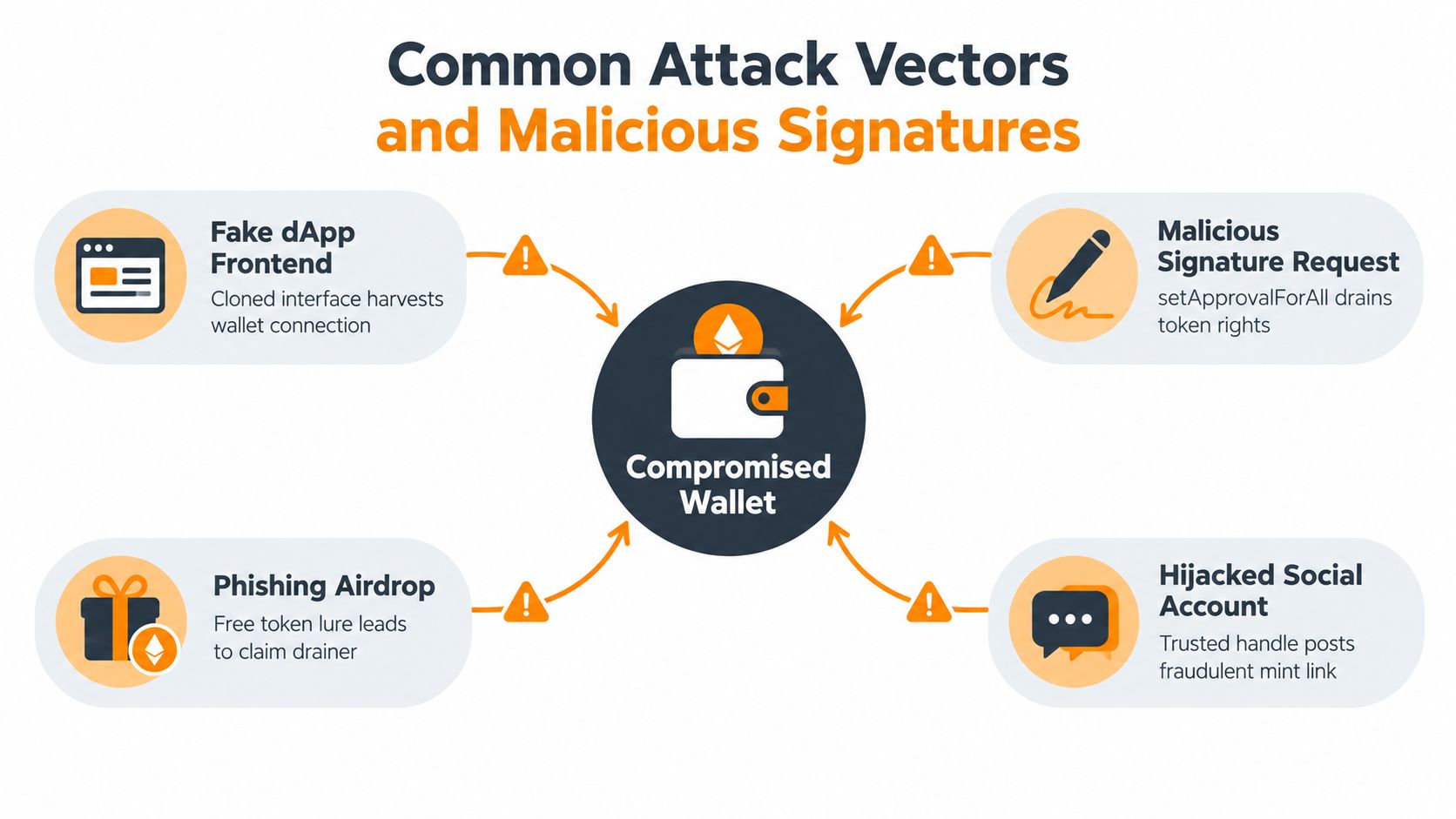
Attackers place malicious requests where people already expect to find crypto help or opportunities. A fake decentralised application may copy the branding, layout, and wallet-connection flow of a known protocol. A Telegram or Discord account may claim to be support and send a “fix” link. A sponsored search advert may lead to a cloned exchange page before the user notices the domain is slightly wrong.
From stolen credentials to stolen permissions
Credential phishing has a familiar sequence:
- The victim visits a fake exchange or wallet page.
- The page requests an email address, password, one-time code, private key, or seed phrase.
- The attacker uses the information to access an account or recreate the wallet.
- The attacker transfers the funds.
Approval phishing changes the point of failure. The victim connects a wallet and signs a message or transaction. The scam contract then receives permission to spend a token, transfer an NFT, or perform another action allowed by the signature. The victim may never type a private key anywhere, yet the wallet can still be exposed.
A request to setApprovalForAll deserves particular caution. On compatible token standards, that permission can give a contract broad control over a category of assets, such as NFTs. Other approval requests may ask for a high or unlimited spending allowance for a specific token. A routine-looking “swap” can therefore create a much larger risk than the user expects.
Where the deceptive request appears
Phishing airdrops use unsolicited tokens or reward claims to create curiosity. The token's name, website link, or wallet metadata may tell the user to “claim” a bonus. The claim page then asks for a wallet connection and presents the draining signature.
Hijacked social accounts are especially persuasive because the post appears to come from a known project, creator, or community member. A fake mint announced through a familiar account can attract users who would ignore a random email. Attackers also use direct messages, fake moderators, and cloned support profiles to move the conversation away from public channels.
Builders should treat the front end as part of the security boundary. A cross-site scripting flaw can alter what users see or inject unwanted behaviour into a legitimate application. A technical overview of the impact of XSS attacks on applications is useful background for teams reviewing how interface vulnerabilities can affect trust and user actions.
What the wallet signature really means
Before signing, identify four things:
- The contract: Is the destination address the one expected for the protocol?
- The function: Does the request say approve, permit, setApprovalForAll, transfer, or something else?
- The asset: Is the permission related to the token you intended to use?
- The scope: Does the request cover one amount, one token, or a broad allowance?
A hardware wallet protects the private key from being copied by a website, but it can't make a malicious transaction safe. The user still has to inspect and reject suspicious requests. Treat every signature as a financial instruction, not as a harmless click-through step.
Real-World Examples of Crypto Phishing Campaigns
The UK evidence shows why crypto phishing should be understood as part of a wider fraud system, not as a minor variation of email spam. The Office for National Statistics explains that fraud reports are recorded through Action Fraud and the National Fraud Intelligence Bureau, while warning that the series doesn't capture the full volume because many victims never report incidents. Its published tables cover years ending March 2013 through March 2025, and its 2026 update says that data for the year ending March 2026 weren't yet held. The UK fraud reporting context therefore points to underreporting as a central issue.
Operation Atlantic and approval phishing
The National Crime Agency's Operation Atlantic provides a direct example of the newer wallet-draining model. The operation identified more than 20,000 victims across the UK, Canada, and the United States, froze more than $12 million in suspected criminal proceeds, and linked more than $45 million in worldwide cryptocurrency fraud losses, according to reporting on the operation by Norton UK.
The NCA said the operation involved approval phishing, where victims were manipulated into granting criminals access to their wallets, often within investment-fraud schemes. One UK victim identified during the operation was believed to have lost more than £52,000, showing how a seemingly small interaction can lead to a substantial personal loss.
The NCA's own description of Operation ATLANTIC is important for one reason: the criminal doesn't always need the victim to send funds manually. The victim may approve a transaction or permission, and the attacker then uses the wallet's authorisation to move the assets.
A seed phrase stolen through impersonation
A Kent case reported by the BBC involved a different but related route. An impersonator posed as a police officer and told victims that a crypto wallet provider would contact them. A fake security officer then asked for their seed phrase, the recovery key that can contain 12 or 24 words. The BBC's account of the Kent case reported that nine people lost £1 million.
The psychological method matters as much as the technical one. A police identity created authority, a supposed wallet provider created urgency, and a security role made the request sound protective. The victims weren't just responding to a badly written email. They were being guided through a staged conversation designed to make the dangerous request feel responsible.
The wider investment-fraud environment
The FCA says reports of crypto investment scams have more than doubled since 2020 and warns that criminals use professional-looking websites which manipulate displayed prices and returns. Its consumer guidance recommends checking firms through the FCA register and crypto investment scam guidance before sending money or entering login details.
The National Crime Agency also said Action Fraud received over 17,000 reports in 2024 from UK victims of crypto investment fraud. It highlighted pressure tactics such as urging people to invest quickly, inviting them into an “exclusive club”, and telling them not to discuss the opportunity with family or friends. The NCA's campaign guidance shows how the wallet interaction often comes after trust and isolation have already been established.
Practical Detection Cues and Red Flags
A convincing logo isn't evidence of a genuine dApp. A familiar account name isn't proof that a message came from the actual project. Check the source independently, then examine the action your wallet is asking you to approve.
Before opening the page
Don't use a link supplied in an unsolicited message if you can reach the service through a bookmark or a known official domain. Compare the spelling character by character. Look for extra words, swapped letters, misleading subdomains, and unusual domain endings. A padlock only indicates an encrypted connection. It doesn't prove that the site belongs to the project it claims to represent.
Check announcements through more than one official channel. If a project says there is a new claim or urgent security action, visit its established website manually and look for matching information. A moderator who insists on private messages, remote access, or a seed phrase is not providing normal support.
The guide to identifying a crypto phishing email or website can help users turn these checks into a repeatable habit.
Before connecting or signing
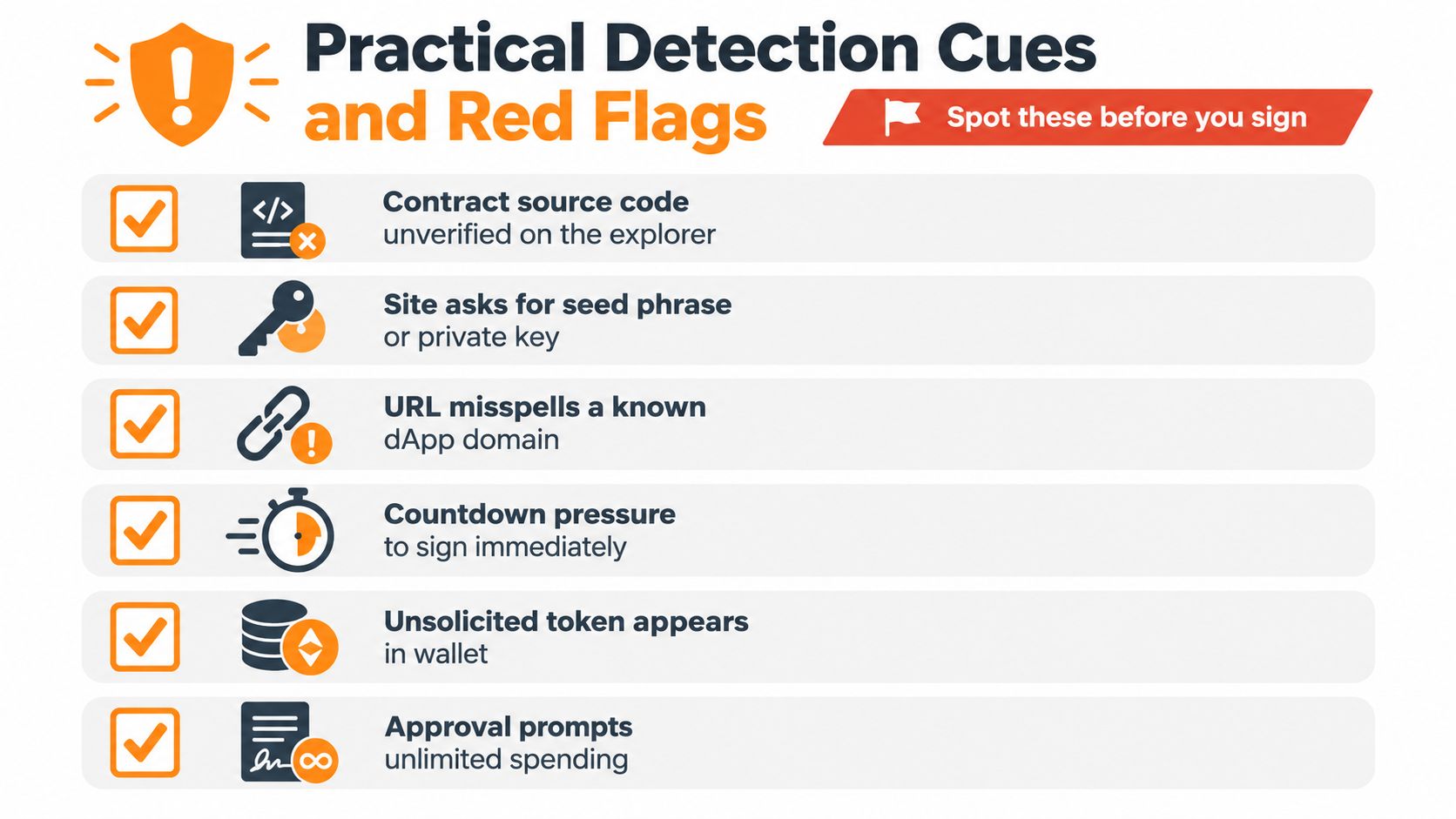
Pause when a site asks for information that a wallet connection should never require. Private keys and seed phrases must stay offline and private. Be cautious with:
- Unexpected tokens: An unsolicited airdrop may be a lure to a claim-drainer site.
- Unrelated approvals: A mint or simple swap shouldn't need broad permission over another asset.
- Unlimited allowances: A request for unlimited spending can create a larger exposure than the immediate transaction.
- Unverified contracts: An explorer warning or missing source code should increase scrutiny, not encourage a quick signature.
- Countdown pressure: A timer exists to reduce careful review. Let the offer expire rather than sign blindly.
- Confusing simulations: If the wallet preview shows an unfamiliar contract, asset, or recipient, reject the request.
Teams that want a broader framework for protecting your organisation from scams can also look at suspicious-activity detection from an organisational perspective. For individual users, the simplest test remains powerful: if you can't explain what the signature does in plain English, don't approve it.
The following video can reinforce the visual checks users should make before interacting with a suspicious request.
Step-by-Step Incident Response for Compromised Wallets
Panic creates openings for a second scam. After a suspected approval or seed-phrase compromise, stop communicating with the person who contacted you and avoid clicking follow-up links promising recovery.
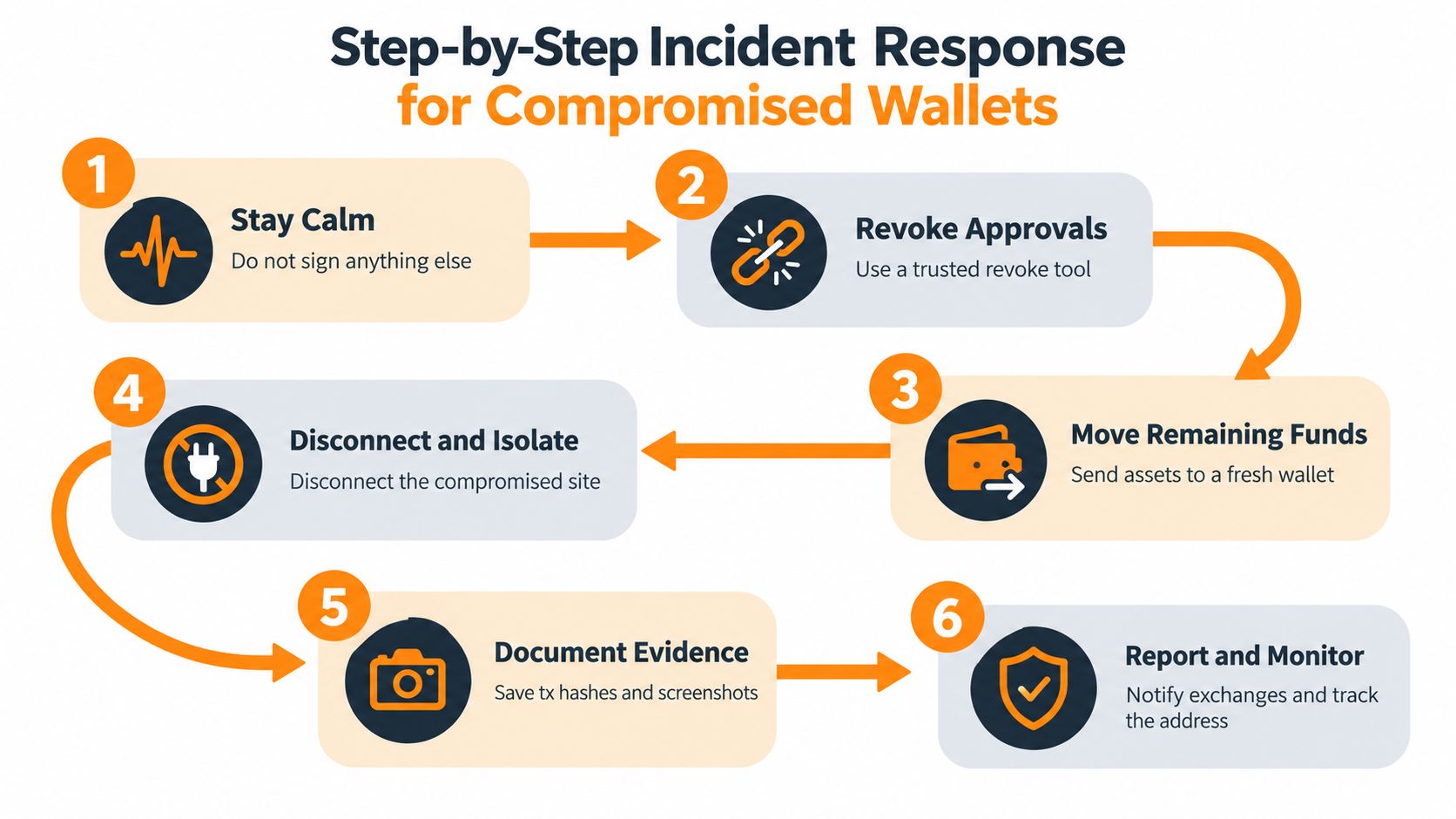
Stop signing. Reject every new wallet request. Don't try to “reverse” the transaction through the same site, and don't approve a test transaction for a stranger who promises to help.
Revoke permissions. Use a trusted token-approval checker or revoke tool reached through a known blockchain explorer or bookmarked service. Review approvals across the networks you use. Revoking a permission can stop later use of that approval, but it won't recover assets already moved.
Move remaining assets. If the seed phrase may have been exposed, create a completely new wallet with a new recovery phrase and transfer remaining safe assets there. Don't import the old phrase into the new wallet, and don't reuse an address that may still be controlled by an attacker.
Isolate the device. Disconnect the suspicious site, close the browser session, and stop using a device if you suspect malware or remote-access software. Run trusted security checks before using it for another wallet. A new wallet won't solve a device problem that continues to expose signatures or credentials.
Preserve evidence. Save transaction hashes, wallet addresses, domain names, screenshots, messages, and the time of each event. Don't edit screenshots or delete conversations. This material can help an exchange, wallet provider, platform, or investigator understand the flow of funds.
Report and monitor. Notify the exchange involved, report the domain and social account, and contact the relevant UK reporting channel or law-enforcement service. Monitor the compromised address and any destination addresses, but don't send funds to anyone claiming they can recover them for an upfront fee.
Official fraud figures can understate the problem because many victims never report incidents, as the ONS warning described earlier. Reporting still matters. It creates records, helps platforms identify infrastructure, and may support action while funds remain traceable.
For a wallet-specific recovery checklist, use The Coin Course's guide to recovering funds from a compromised mobile crypto wallet.
Prevention Best Practices for Users and Web3 Builders
Users and builders control different parts of the attack surface. A holder controls where they connect and what they sign. A project team controls how clearly its interface explains permissions, how it communicates with the community, and whether suspicious actions receive a meaningful warning.
A safer setup for users
Keep high-value assets in a hardware wallet or another carefully protected storage arrangement, while using a separate wallet for unfamiliar mints, airdrops, and experimental dApps. A dedicated “burner” wallet limits the damage if a speculative interaction grants a malicious permission. It isn't a licence to sign carelessly, but it creates separation between testing and long-term holdings.
Review token approvals regularly and revoke permissions you no longer need. Keep wallet software, browsers, and operating systems updated, and use two-factor authentication on exchange and email accounts where it is available. Two-factor authentication won't prevent a malicious on-chain signature, but it can reduce the chance that a stolen password becomes an exchange takeover.
Use bookmarks for important services. Don't store a seed phrase in cloud notes, email, screenshots, or a password manager unless you fully understand the security trade-offs of that arrangement. A recovery phrase should never be entered into a website, support form, or chat.
Better controls for builders
A dApp should tell users what they are about to authorise in understandable language. Instead of showing only a raw contract call, the interface should identify the contract, token, amount, recipient, and whether the permission is temporary or broad. Where possible, integrate transaction simulation and explain outcomes before the wallet prompt appears.
Project teams should publish official domains and communication channels clearly. They should avoid sending unsolicited direct messages to users, and moderators should never request seed phrases, private keys, or remote access. If a domain or social account is compromised, the team needs a fast public warning channel that doesn't depend on the compromised account.
Builders should also review front-end dependencies, access controls, contract permissions, and deployment addresses. Security testing needs to cover not only the smart contract but also the page that constructs the transaction. Teams planning simulated phishing exercises can consult legal tips for phishing tests so training activity doesn't create confusion or expose real credentials.
A shared operating habit
The strongest defence is a pause at the boundary between social persuasion and wallet authorisation. Users should verify the source and read the signature. Builders should make that verification possible by displaying meaningful information instead of hiding risk behind technical language.
Final Thoughts on Securing Your Digital Assets
Crypto phishing scams have moved beyond the obvious fake login page. The fraud chain may begin with a social post, a private message, a search advert, or an apparently helpful support agent. It can end with a seed phrase disclosure, an approval permission, or a malicious smart contract signature inside a wallet the victim still believes they control.
That shift changes the core security question. Don't ask only whether a website looks genuine. Ask which contract you're interacting with, what the signature permits, which assets it affects, and whether the request matches the action you intended to take.
A reliable routine is simple, although it requires discipline: reach services through known channels, keep recovery phrases private, separate high-value holdings from experimental activity, review approvals, and stop when a request creates pressure or confusion. If you sign something harmful, act quickly, isolate the device, move remaining assets to a fresh wallet, preserve evidence, revoke permissions, and report the incident.
Security education reduces hesitation at the moment it matters. The Coin Course offers practical learning resources on wallets, phishing detection, blockchain fundamentals, and digital-asset safety, so use The Coin Course to build a verification habit before your next wallet interaction.
The Coin Course helps newcomers, investors, and Web3 builders understand crypto security through clear guides and practical steps. Visit The Coin Course to learn how to identify phishing attempts, protect wallet access, and make more informed decisions before signing.