You've bought your first meaningful amount of crypto. Maybe it's enough that you'd feel sick if it vanished. So now you're doing what is commonly done right after the excitement wears off. You're staring at your exchange account, your wallet app, and your email inbox, wondering whether a single password is really all that stands between you and a very bad day.
That worry is healthy.
Crypto changes the stakes. If someone drains a bank account, there may be a fraud team, a chargeback process, or some kind of safety net. If someone gets into your exchange account, resets your wallet protections, or tricks you into approving the wrong thing, recovery can be slow, messy, or impossible. Blockchain transactions don't care that you were hacked. They only care that a valid action happened.
That's why two-factor authentication matters so much. It's one of the simplest upgrades you can make, and one of the most misunderstood. A lot of beginners think enabling any old code by text message means they're safe. Others set it up once, skip the recovery codes, lose a phone, and discover that the security feature meant to protect them has locked them out instead.
Both mistakes are common. Both can cost you.
The Login Alert That Chills Every Crypto Owner
You're making tea. Your phone buzzes. You glance down and see a login alert from an exchange you use. New device. New location. Not you.
For a second, your mind starts racing. Did you reuse that password somewhere? Did you click something dodgy last week? Is someone in your account right now changing your email, selling your holdings, or trying to withdraw funds?
That moment is why people finally take account security seriously.
A password by itself is like locking your front door with one basic lock and leaving the spare key under the mat. It might stop casual trouble, but it won't hold up well if someone has already found your password in a data breach, tricked you with a fake login page, or guessed a weak one. Crypto attackers know that account access is often easier than cracking wallets directly, so they go after email accounts, exchange logins, and recovery flows.
Why crypto panic feels different
With crypto, the fear is sharper because mistakes can move fast. An attacker doesn't need to steal your whole identity to hurt you. They only need access at the wrong moment.
A simple example:
- Email gets compromised: An attacker resets your exchange password.
- Exchange lacks strong second-factor protection: They log in and start changing settings.
- You notice late: The account may already be under their control.
One extra login step can be the gap between “someone knows my password” and “someone can actually get in”.
The real job of 2FA
Two-factor authentication isn't there to make logins annoying. It's there to stop a stolen password from being enough.
That's the whole idea. If a criminal knows one thing about you, they still shouldn't be able to act as you. For a crypto holder, that's not just nice to have. It's basic safety.
What Is Two-Factor Authentication and Why It Matters
Two-factor authentication, or 2FA, means a password is no longer enough on its own. After you enter what you know, the account asks for a second kind of proof, usually something you have, such as a code from an app or a physical security key.
That difference matters because attackers rarely break into crypto accounts by brute force. They buy leaked passwords, steal them with phishing pages, or reset them through a compromised email account. 2FA turns that stolen password from a working key into only part of the puzzle.
The three factor types
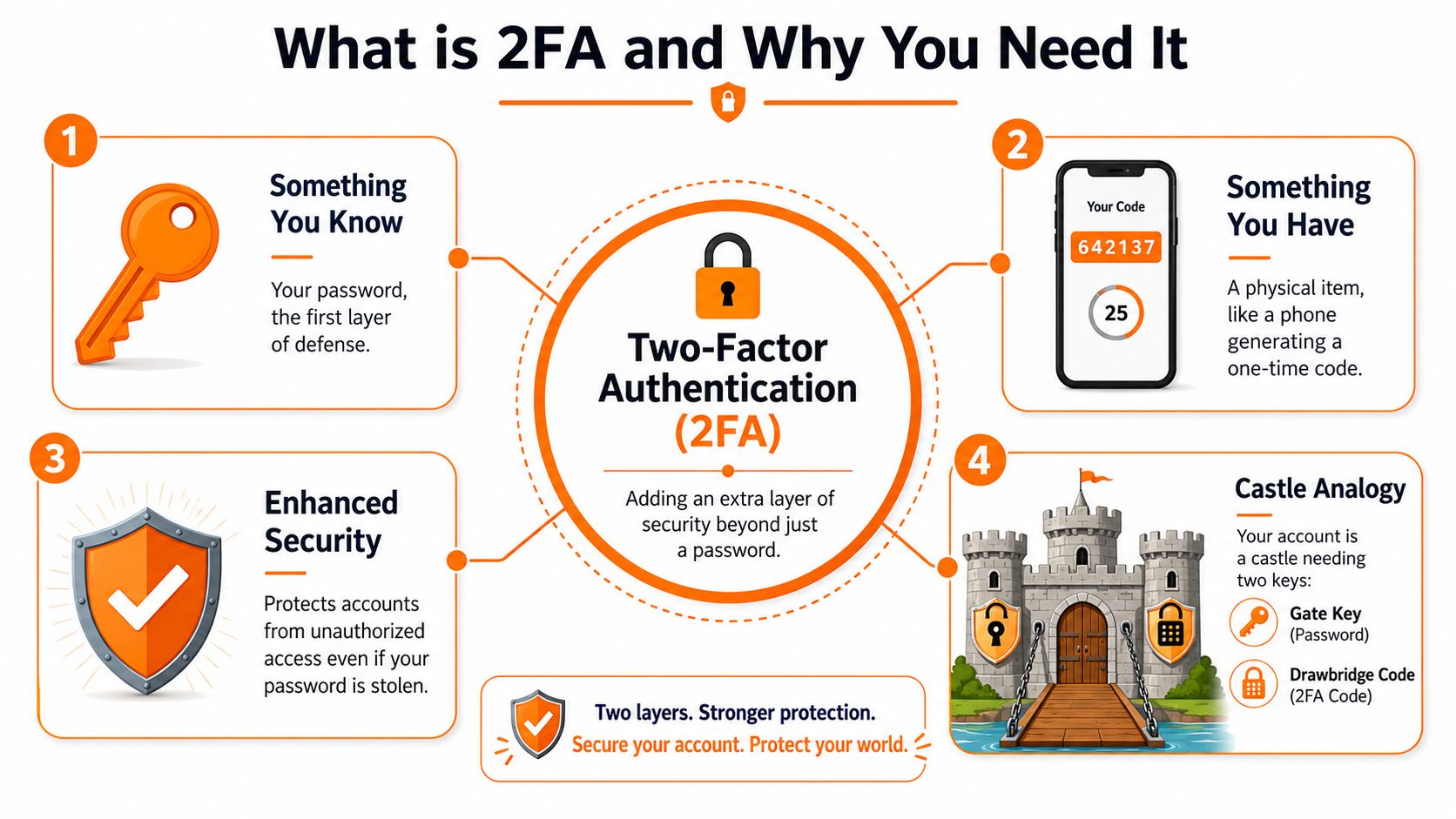
2FA is built from three basic categories:
Something you know
A password, PIN, or passphrase.Something you have
A phone running an authenticator app, a hardware security key, or a device that receives a one-time code.Something you are
A fingerprint, face scan, or other biometric check.
The key idea is variety. Two passwords are still one kind of proof. A password plus an app code counts as two different factors.
Why crypto users need to care about more than setup
For a social media account, losing access is stressful. For a crypto account, it can mean funds are traded, withdrawn, or locked behind a recovery process you did not prepare for.
That last part gets ignored all the time.
A lot of beginners treat 2FA like installing a stronger lock and stop there. The safer way to see it is this. You are adding a second lock, and you also need to know what happens if that second key is lost, stolen, broken, or trapped inside a dead phone. In crypto, poor recovery planning can hurt almost as much as weak login protection.
Here is a common example. Someone enables an authenticator app, feels safer, upgrades phones months later, and realizes the codes did not transfer. If the exchange asks for the old device or backup codes, and those are gone, the account owner may face delays, identity checks, or permanent loss of access at exactly the wrong time.
A quick reality check on weaker second steps
A second step is only helpful if it is separate from the first and hard for an attacker to intercept. SMS codes are still widely offered, but they rely on your phone number, which can become a target through SIM swapping and account recovery abuse. That is one reason people sometimes get temporary numbers for SMS verification, but for protecting meaningful crypto holdings, an authenticator app or hardware key is usually a better long-term choice than tying security to a phone number.
A short visual explainer helps if you want to see the castle idea in action:
Where beginners get confused
The biggest misunderstanding is simple. Turning on any form of 2FA does not automatically mean you are well protected.
You need to ask three questions.
- What is my second factor?
- How easy is it to phish, intercept, or reset?
- How do I recover access if my device disappears today?
If you only answer the first question, you have done half the job. Crypto security is not just about stopping intruders. It is also about making sure you do not lock yourself out of your own money.
Comparing 2FA Methods From Good to Best
Not all two-factor authentication methods deserve the same level of trust. Some are fine for low-risk accounts. Some are better for everyday exchange logins. A few are the right choice when your crypto stack starts becoming serious money.
The UK's National Cyber Security Centre recommends phishing-resistant MFA such as FIDO2-compliant authenticators rather than SMS codes, which remain vulnerable to interception and SIM-swapping attacks, as stated in the NCSC guidance on MFA for corporate online services. That advice applies neatly to crypto as well.
The quick ranking
Here's a practical way to think about the common options.
| Method | How It Works | Security Level | Best For |
|---|---|---|---|
| SMS codes | A text message sends a one-time code to your phone number | Lowest of the common 2FA options | Basic accounts where nothing stronger is available |
| Email codes | A login code arrives in your email inbox | Low | Low-risk accounts, not ideal for crypto |
| Authenticator app | An app such as Google Authenticator or Authy generates changing codes on your device | Good | Most exchange users starting to take security seriously |
| Push approval | An app sends a prompt asking you to approve the login | Good, but depends on careful user behaviour | Convenient logins where you can review prompts closely |
| Hardware security key | A physical key such as a FIDO2 device confirms the login cryptographically | Best | Serious investors, long-term holders, high-value accounts |
| Passkeys | Device-bound credentials use modern cryptography for sign-in | Strong and promising | Services that support modern passwordless login |
SMS is better than nothing, but it has real weaknesses
SMS codes feel familiar. That's why people pick them first. But your phone number is not as solid an identity tool as it seems. If a criminal tricks a mobile provider into moving your number to a new SIM, your codes can follow them.
That's one reason I'm firm with crypto users. If an exchange offers only SMS, use it while planning an upgrade. Don't treat it as your ideal end state.
There are also edge cases where people use services to get temporary numbers for SMS verification. That can be useful for testing workflows or separating low-value signups from your personal number, but it's not how I'd protect a main crypto account. For assets you care about, you want a second factor tied to you and under your control, not something temporary or easy to lose track of.
Authenticator apps are the practical sweet spot
Apps like Google Authenticator, Microsoft Authenticator, and Authy generate short-lived codes on your device. They don't depend on your phone number, which removes one of SMS's biggest risks.
These apps are usually the best first serious upgrade for a beginner because they balance security and convenience well.
A few points matter:
- Good fit for exchanges: Most major platforms support them.
- Offline code generation: You can still get a code without mobile signal.
- New recovery risk: If your phone dies and you never stored backup details, you can lock yourself out.
The method that protects you can also trap you if you ignore recovery.
Push approvals are convenient, but convenience can backfire
Some systems send a prompt that says “Approve sign-in?” and let you tap once. That's easy. It's also easy to approve the wrong prompt when you're tired, distracted, or being pressured by a scammer.
If you use push-based approval, slow down. Read the details. If a login request appears when you aren't signing in, deny it and change your password.
Hardware keys are the strongest mainstream option
A hardware security key is a small physical device, often USB, NFC, or both. You plug it in or tap it to confirm a login. Good ones support FIDO2, which is designed to resist phishing far better than code-based methods.
For a meaningful crypto portfolio, this is my preferred route for exchange logins and key accounts like your primary email. It's a stronger line of defence because the login is cryptographically tied to the actual service, not just a code you can be tricked into typing on a fake page.
Where passkeys fit
Passkeys are part of the newer move towards passwordless and device-bound logins. They can offer a smoother and stronger experience on supported platforms. For beginners, the main takeaway is simple: if a trusted service offers passkeys, it's worth understanding. They point towards a future where you rely less on shared secrets and more on cryptographic proof.
How to Set Up 2FA on Crypto Exchanges and Wallets
You buy more crypto than usual, log out, and decide to tighten security before you go to bed. Ten minutes later, the exchange says 2FA is enabled. That feels reassuring. What matters is whether you could still get into the account if your phone died tomorrow.
A careful setup has two jobs. It should block an attacker, and it should leave you a safe way back in if a device is lost, stolen, reset, or replaced. Many people complete the first job and forget the second.
The basic setup flow
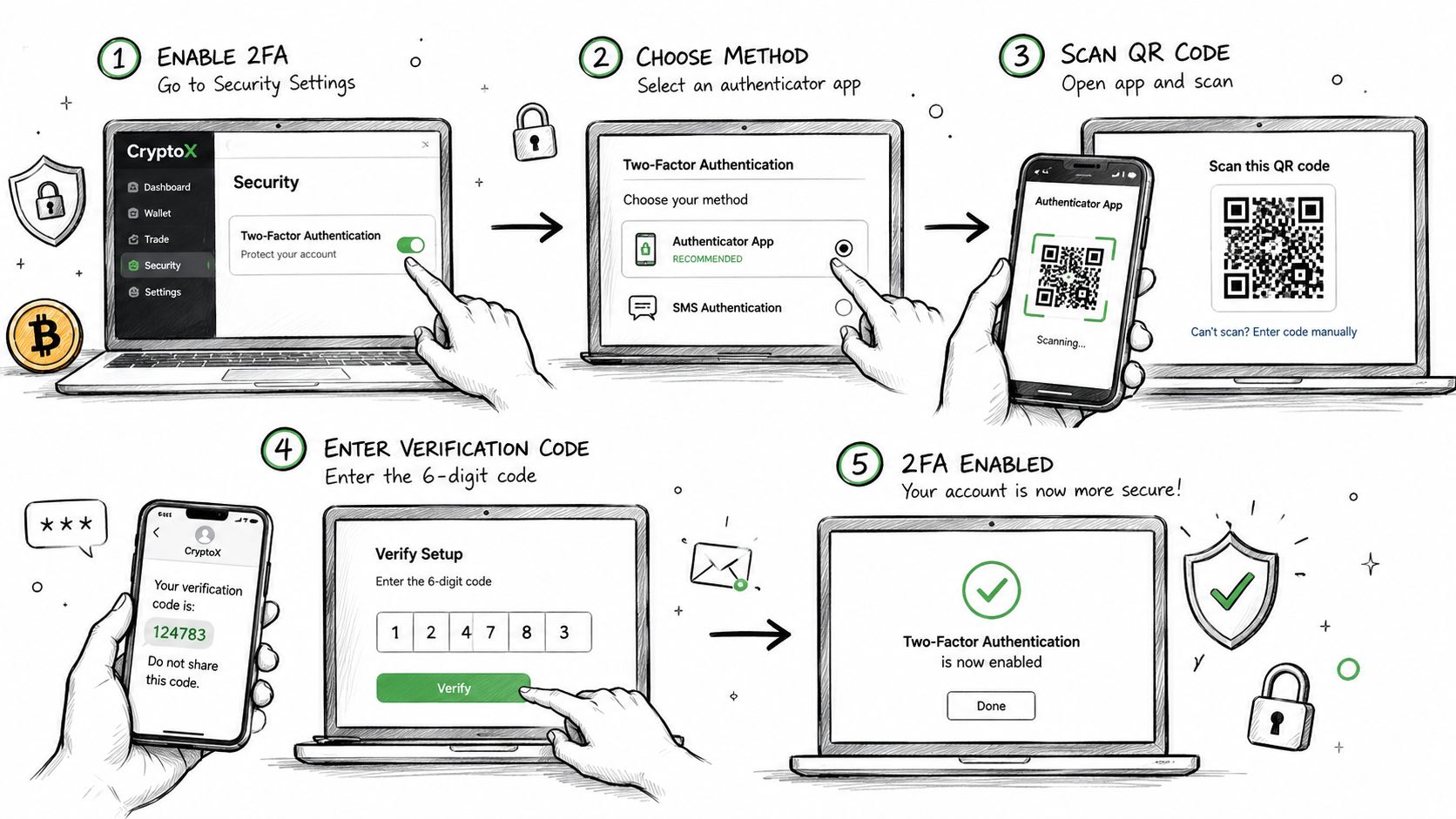
Most exchanges and many wallet apps use a familiar process:
Sign in and open security settings
Look for Security, Login & Security, Account Protection, or a similar menu.Choose the strongest method the service supports
Pick an authenticator app or hardware key if you can. Avoid SMS if a stronger option is available.Scan the QR code or register the key
Your authenticator app stores the shared secret and starts generating time-based codes. A hardware key pairs directly with the account.Enter the confirmation code or approve the prompt
This proves your device is linked correctly before the platform turns 2FA on.Stop and save the recovery material
This may be backup codes, a setup key, or instructions for adding a second device. Read the screen slowly. The wording matters.Sign out and test a real login
A proper test confirms more than setup success. It confirms you know which app or key the account expects.
That flow sounds simple because it is. The risk comes from rushing through the screens that appear once and then disappear.
The step people regret skipping
Save your backup codes or recovery details before you click past the setup screen.
Treat that step as part of setup, not as an optional extra.
A good comparison is changing the lock on your front door. You would not fit the new lock and then throw away the only spare key by accident. Yet that is exactly what happens when someone stores recovery codes in a notes app on the same phone that holds the authenticator app.
Use separate places. If your phone is the lock, your recovery record should be the spare key stored somewhere else.
A practical beginner routine
Use this routine each time you enable 2FA on an exchange:
- Prepare your storage first: Have paper or another offline method ready before you start.
- Enable 2FA slowly: Read each setup screen instead of tapping through by habit.
- Record backup codes clearly: Write them neatly and label the account they belong to.
- Store the record away from your phone: A safe, locked document folder, or another secure offline location works better than a screenshot.
- Log out and test the login once: Confirm the code works while you still have the setup screen fresh in mind.
- Check the account recovery options: Look for a second device slot, backup key support, or any recovery contact process.
If you use Coinbase, this walkthrough on how to enable two-factor authentication on Coinbase helps map the general steps to a real exchange interface.
Wallets and exchanges need different thinking
An exchange account usually protects a username, password, and account dashboard. A non-custodial wallet often protects access in a different way. You may approve actions on a device, use a seed phrase for recovery, or rely on the phone's own security controls instead of a standard website login.
That difference causes confusion for beginners. Adding 2FA to an exchange does not protect a seed phrase written on paper. Securing a wallet app does not strengthen the email account that can reset your exchange login. Each part of your crypto setup has its own failure point.
Set up 2FA where logins exist. Then check what recovery method each service uses, because the worst crypto security mistakes happen after setup, when a device disappears and nobody remembers where the backup went.
Your Guide to 2FA Backups and Recovery
The question that matters most usually shows up too late: what happens if you lose your phone?
That's not a small detail. It's the part of two-factor authentication that can save you from hackers or lock you out of your own money. In the UK, that recovery problem is often poorly defined. UKRO has highlighted “what to do if you lose your device” as an unresolved issue in its 2FA preparedness webinar information. In plain English, many users are still expected to rely on their own stored recovery codes rather than a clear, reliable institutional fallback.
Your recovery plan needs to exist before trouble starts
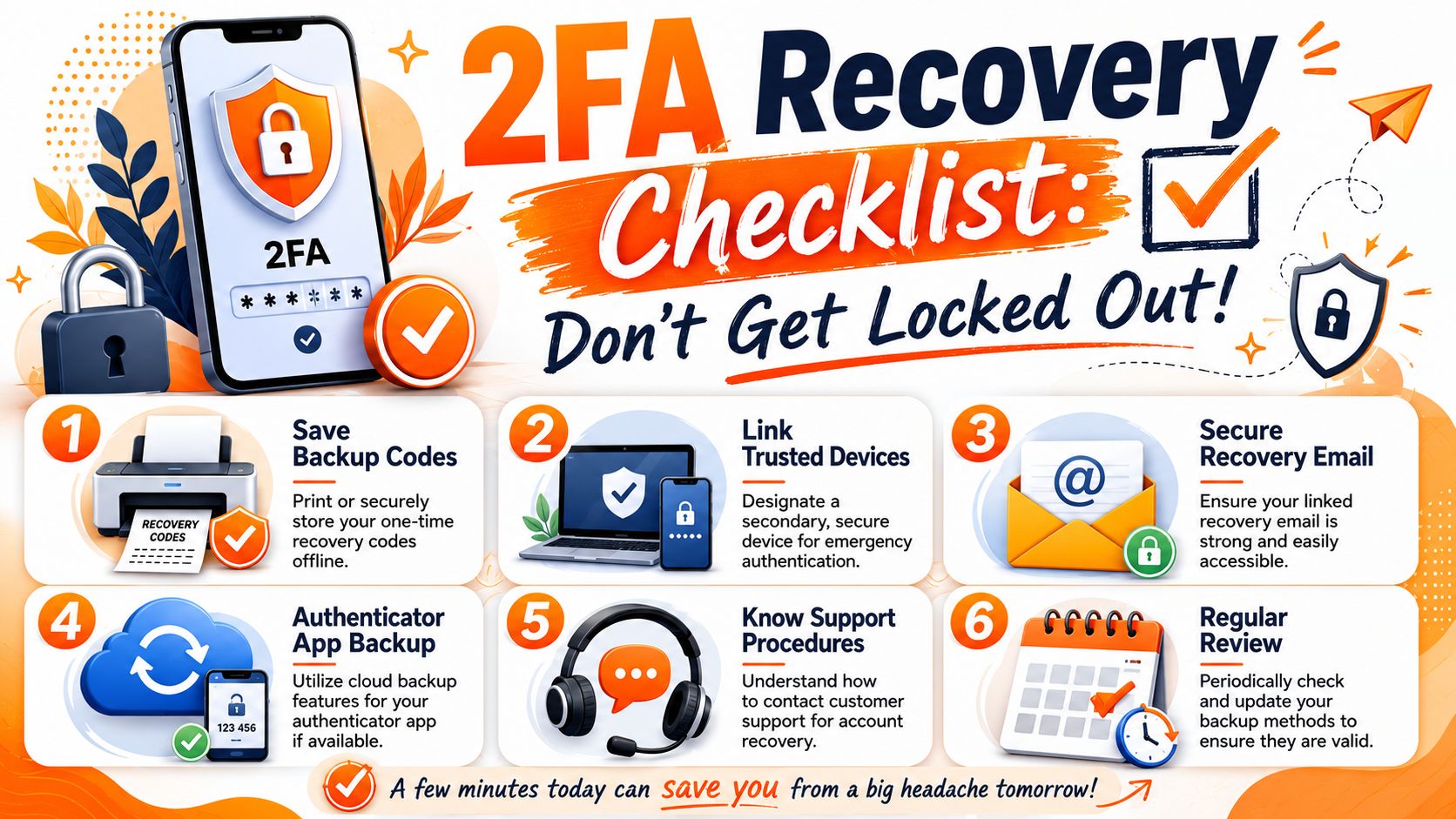
If your 2FA device disappears, there are only a few ways back in:
- backup codes you saved earlier
- a second registered device
- a pre-planned support route
- a backup hardware key, if the service supports it
If none of those exist, you're left hoping the platform will make an exception for you. Hope is not a security strategy.
What to do with backup codes
Treat recovery codes like house keys to a property full of valuables. They need to be available in an emergency, but hidden from casual access.
A strong pattern looks like this:
- Keep them offline: Paper stored securely is simple and hard for remote attackers to steal.
- Use more than one location: If one copy is damaged by fire, water, or simple bad luck, you still have options.
- Separate the copies: Don't keep every backup in the same bag or drawer.
- Review them after major changes: New phone, new authenticator, new exchange account, new backup routine.
If your crypto is worth protecting, your recovery codes are worth protecting too.
What not to do
Some mistakes are so common that they deserve a blunt warning.
- Don't save a screenshot on the same phone that runs your authenticator app.
- Don't leave codes in unencrypted cloud notes you access casually from everywhere.
- Don't assume support will rescue you quickly if your account gets locked.
- Don't keep your only copy in a place other people can browse.
The same mindset applies to broader crypto recovery material. If you want a practical framework for storing sensitive recovery information safely, this guide on how to safely store your crypto seed phrase and recovery keys is worth reading alongside your 2FA plan.
Build a low-stress fallback
The best setup is boring. You lose a phone, you fetch a backup code or use a secondary method, you sign in, and you rotate your security settings. No panic. No pleading with support. No guessing where you saved things.
That peace of mind is the hidden half of 2FA. The setup matters. The recovery plan matters just as much.
Beyond Basic 2FA Advanced Crypto Security
Once your holdings move from “interesting” to “important”, basic app-based 2FA stops being the finish line. It becomes the floor.
A lot of people like biometric login because it feels smooth. In the UK, 89% of mobile-banking app users use fingerprint or facial recognition as their primary login method, according to SQ Magazine's summary of password statistics. That tells you convenience wins adoption. But convenience and top-tier security are not the same thing.
Hardware first for serious accounts
For significant crypto holdings, my view is simple. Use dedicated hardware wherever possible.
That means a hardware security key for exchange logins and a hardware wallet for long-term storage. Biometrics are useful on your phone or laptop, but they should sit inside a stronger overall setup, not replace it. Your face authenticating a device is convenient. A dedicated key that resists phishing is stronger for account access.
Multi-signature is like 2FA for the assets themselves
A multi-signature wallet requires more than one approval to move funds. Think of it as a vault that needs two or three separate keys before the door opens. One key might be on a hardware wallet at home. Another might be on a backup device in a different location. A third might be held by a trusted partner or business co-signer, depending on the setup.
That changes the risk model. Even if one device is compromised, one signer alone can't move the funds.
If you want to go deeper, this explainer on unlocking multi-signature wallets and how they protect your crypto is a solid next step.
Start thinking like your own bank
Advanced crypto security isn't one trick. It's a personal system.
Ask yourself:
- What protects my email account?
- What happens if my main phone is lost today?
- Could one phishing mistake expose everything?
- Do I have a second hardware device or fallback method?
Strong crypto security comes from layers that fail safely, not from one clever app setting.
If that sounds more serious than ordinary online life, that's because it is. In crypto, self-custody and personal responsibility aren't slogans. They're operational requirements.
Your Action Plan for Bulletproof Security
If you've read this far, don't leave this as “good information”. Turn it into action today.
Start with these three moves
Enable two-factor authentication on every crypto-related account
Prioritise your primary email, exchange accounts, and any wallet services that support account-level login protection. If possible, choose an authenticator app or hardware key over SMS.Store your backup codes offline in secure locations
Write them down carefully. Keep them somewhere you can reach in an emergency but others can't casually access.Remove weak copies of sensitive recovery material
Delete screenshots, random text files, and messy notes that leave your fallback plan exposed.
Then tighten the system
A stronger routine looks like this:
- Protect the email first: Your inbox is often the reset button for everything else.
- Add a second hardware option where possible: A spare security key can remove a lot of recovery stress.
- Review support procedures in advance: Don't wait until you're locked out to find out how a platform handles identity checks.
- Explore modern tools carefully: If you're comparing newer login models, an open-source authentication solution can help you understand the wider move towards stronger, more modern authentication design.
Security doesn't need to feel mysterious. It needs to be deliberate. A good setup means a stolen password isn't enough, a lost phone isn't a disaster, and a moment of panic doesn't turn into permanent fund loss.
If you want practical crypto security guides that stay grounded in real-world habits, The Coin Course is a strong place to keep learning. It's built for people who want clear explanations, safer routines, and a better grasp of how to protect their assets before mistakes become expensive.