A Bitcoin paper wallet is, in simple terms, a printed piece of paper that holds the critical information for your crypto: a public key for getting paid in Bitcoin and a private key for spending it. Think of it as the ultimate form of 'cold storage'—your keys are kept totally offline, far away from online hackers and scams.
What Is a Bitcoin Paper Wallet Really?
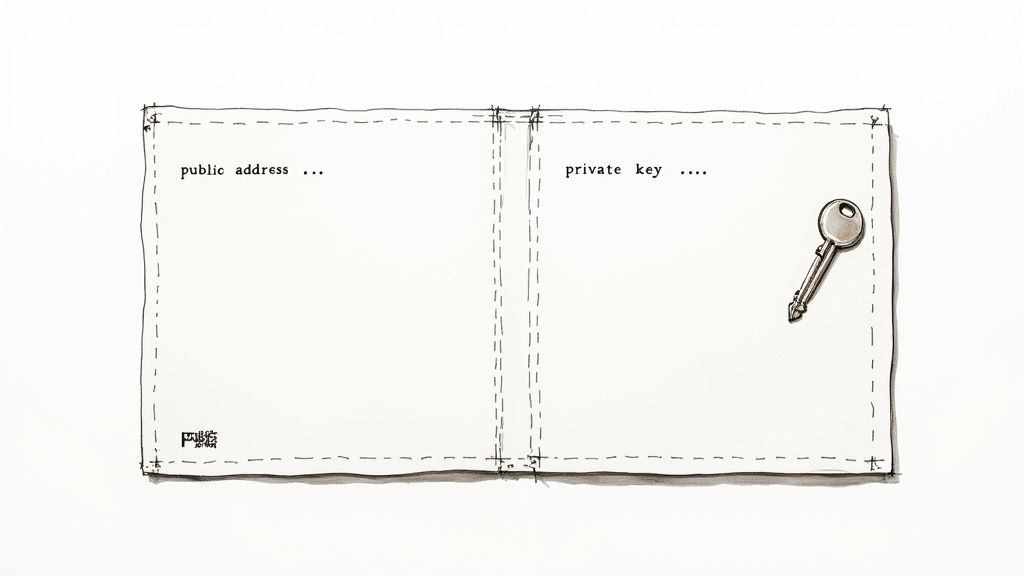
Every Bitcoin wallet has two basic parts. The first is the public key, which works a bit like your email address or bank account number. You can share this with anyone without worry; it’s how people send Bitcoin to you. For example, if your friend Sarah wants to send you 0.01 BTC, you give her this public key.
The second, and much more important, part is the private key. This is the secret password to your digital money. If anyone gets this key, they have total control over your funds and can spend them. This is why keeping it safe is everything. Our guide on public and private keys explains in more detail how these work together.
A paper wallet is simply these two keys printed out, often with QR codes next to them to make scanning with a phone camera easy. By printing them, you physically cut their connection to the internet, creating a powerful security wall.
The Power of Cold Storage
Taking your keys offline is what we call cold storage. It’s the total opposite of 'hot wallets,' which are the apps you run on your internet-connected phone or computer. Because a paper wallet has no link to the internet, it’s naturally safe from the most common digital threats.
- Hacking attempts: A cybercriminal in another country can't break into a wallet that isn't connected to their network. It's that simple.
- Malware and viruses: Sneaky software on your computer, like a program that records your typing, can't steal keys that are safely stored on a piece of paper in your drawer.
- Phishing scams: You can't be tricked into entering your private key on a fake website if it's tucked away in a safe at home.
A paper wallet puts security completely in your hands. It avoids the risk of leaving your coins on a crypto exchange and protects you from online theft. But this also means you are 100% responsible for keeping that piece of paper safe from being lost, damaged, or stolen.
Is This Method Still Relevant Today?
With fancy hardware wallets now easy to buy, some might think paper wallets are a bit old-fashioned. But their simplicity is their biggest strength. For anyone looking to hold Bitcoin for the long term—what people call 'HODLing'—they offer a super secure, basically free way to store it.
This is more important than ever as more people get into crypto. Take the United Kingdom, for instance, which has seen a huge jump in crypto users. It’s estimated that around 24 million people in the UK now own crypto, which is almost 35% of the population. This big trend, as shown in a report on the UK’s rapid crypto adoption, shows why we need reliable and secure storage methods that normal people can understand and trust.
Paper Wallet Pros and Cons at a Glance
Before you start, it helps to see the whole picture. Here’s a quick list of what makes paper wallets good, and where you need to be extra careful.
| Advantages (Pros) | Disadvantages (Cons) |
|---|---|
| Complete Offline Security: Safe from online hacking and viruses. | Vulnerable to Physical Damage: Can be ruined by fire, water, or just tearing. |
| Full User Control: You hold your keys, no company is involved. | Risk of Physical Theft: If someone steals it, they can access your money. |
| Cost-Effective: Basically free to make, you just need a printer. | Complex to Use Securely: Needs careful steps to create and spend from. |
| Simple Concept: The basic idea is easy to grasp. | Prone to User Error: Small mistakes during setup can lead to losing your funds. |
As you can tell, the trade-off is clear: you get amazing digital security but you have to handle the physical protection all by yourself. For long-term savers who get the risks, it’s still a great tool.
Creating a Secure Offline Environment
Before you even think about making your bitcoin paper wallet, we have to talk about the most crucial part of the whole process: setting up a totally secure, offline workspace. This isn't just a friendly tip; it's the foundation of the whole security plan. A computer connected to the internet is always at risk, and making your keys on a machine that might have a virus completely defeats the purpose.
The whole idea is to create a digital 'clean room'—a temporary, sterile space that has never been online and is guaranteed to be free of any hidden malware. Picture it like a surgeon scrubbing their hands before an operation. You're getting rid of any possible germs before you handle something precious.
Your Pre-Flight Security Checklist
To do this right, you need to be positive your computer is both clean and offline. The first, most obvious step is to disconnect from the internet. That means turning off your Wi-Fi and unplugging any network cables from your computer. This creates what's called an 'air gap'—a physical space stopping any bad software from calling home with your new private key.
But just unplugging the internet isn't enough if your machine is already infected. Nasty software, like a keylogger, could be sitting quietly, waiting to record your private key the moment you create it. As soon as you go back online, it would send that valuable data straight to a hacker.
So, at the very minimum, run a deep scan with up-to-date antivirus and anti-malware software. A full system scan is a must. You need to find and remove any threats before you go any further. This combination—being offline and confirmed as clean—is your absolute minimum for safety.
The Gold Standard: A Live Operating System
For anyone who is serious about security (and you should be), the best method is to use a temporary, live operating system, or 'live OS', that runs completely from a USB stick. An OS like Tails or Ubuntu can be started directly from a USB drive, giving you a perfectly clean, untouched environment for the job.
Because this operating system loads fresh into your computer's memory every time, it never even uses your main hard drive. This means any virus that might be hiding on your regular Windows or macOS is completely avoided. It's like using a brand-new, factory-sealed computer for the 20 minutes it takes to create and print your wallet.
Here’s why this method is so strong:
- Total Isolation: The live OS is completely separate from your everyday system, which has likely been exposed to countless online risks.
- Built-in Amnesia: As soon as you shut down, the entire session is wiped clean from memory. It leaves no trace of your keys anywhere on the computer.
- Genuine Peace of Mind: You can be truly sure that no hidden software is watching what you're doing.
Booting from a live OS on a USB stick is the professional way to generate a paper wallet. It guarantees that no hidden software can steal your private key during its brief, critical moment of creation.
This careful approach is a key part of cold storage, a basic idea in crypto security. To get a better feel for why this is so important, you can read our detailed guide on choosing between hot and cold wallets. Taking these careful, planned steps is what makes the difference between a truly secure offline wallet and one that just gives you a false sense of security.
Generating Your Wallet Keys Offline
Alright, with your digital workspace now completely clean and offline, it’s time for the main event: creating your bitcoin paper wallet. This all comes down to using a trusted key generator to create the unique public and private keys that will become your new wallet.
A popular and reliable tool for this is BitAddress.org, an open-source generator that runs right in your web browser.
The clever trick here is to get the tool before you go offline. While you're still connected to the internet, go to the BitAddress.org GitHub page, find the newest version, and download the single .html file. Save this file directly onto your clean USB stick. This simple step lets you run the whole key creation process on your offline machine, meaning your new keys never come close to the internet.
Creating True Randomness
Once you've started your secure, offline computer and opened the BitAddress.org file you downloaded, you'll see a randomness generator. For your wallet to be secure, the keys must be made from a truly unpredictable source. That’s where you come in.
Your job is to feed the program random data. You do this by moving your mouse all over the screen in messy patterns or by typing random letters on your keyboard.
You’ll see a percentage counter go up as you do this. It’s measuring the ‘entropy’—a fancy word for randomness—it’s collecting from your actions. Keep going until it hits 100%. Don’t rush this; the more random your movements, the stronger and safer your private key will be.
As the infographic shows, getting your offline environment secure first is the most important part of this whole process.
It really just comes down to those three vital stages: disconnecting, scanning for any bad software, and then booting from a clean source. Only then should you even think about creating a key.
Adding an Extra Layer of Protection with BIP38
Before you finish making the wallet, you can add a very powerful security feature: BIP38 encryption. This lets you lock your private key with a password. In simple terms, it's like putting a password on your secret key.
If you choose to do this, anyone who physically steals your paper wallet is still out of luck. They would also need to know your secret password to unlock the funds. Without it, the private key is just a useless string of text. It’s a fantastic defense against physical theft. For instance, imagine someone breaks into your safe and steals the wallet – they still can’t touch your Bitcoin without the password you memorized.
I strongly recommend using BIP38 encryption. It turns your paper wallet from a simple bearer asset (whoever holds it, owns it) into a two-factor security device: something you have (the paper) and something you know (the password).
Once you've generated enough randomness (and maybe set a BIP38 password), the tool will show your brand new wallet, with both the public and private keys. Your public address, which usually starts with a '1' or '3', is the one you can safely share with people to receive Bitcoin.
The private key, however, is the big secret. It will probably start with a '5', 'K', or 'L', and you must protect it carefully. Never show it to anyone, and definitely don't take a photo of it with your phone if it's connected to the internet. Understanding the difference between the public (shareable) and private (secret) key is the single most important idea in all of this.
How to Print and Store Your Wallet Safely
You’ve successfully created your keys offline, which is a huge step toward securing your Bitcoin. But the digital part of the job is over; now you have a new, very physical task. A bitcoin paper wallet is only as safe as the paper it’s printed on and where you choose to keep it.
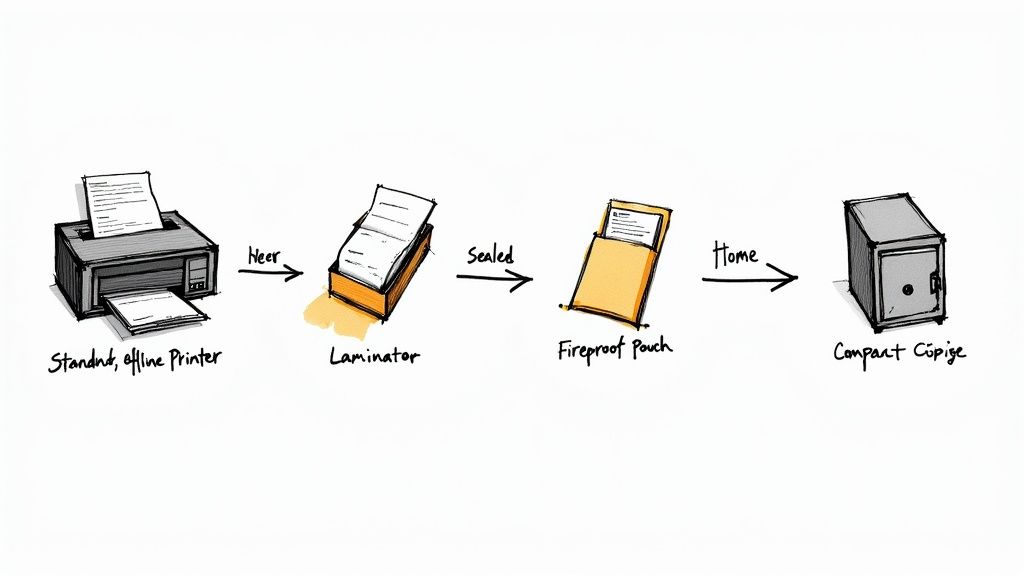
The first challenge is the printer itself. This is super important: you must use a printer that has no connection to any network. That means no Wi-Fi, no Bluetooth, and no plugging it into your internet router. Why? Because many new printers have internal memory that can save a copy of what they print, which would undo all your hard work to stay offline. An old, basic USB printer is perfect for this job.
Choosing Your Printing Method
Once you have a good offline printer, think about the paper. This isn't the time for regular, flimsy office paper. Using high-quality, acid-free paper will help stop the ink from fading and the paper from falling apart over time. Think of this document like the official deed to your house; it needs to be made to last.
Here are a few handy tips I've learned over the years:
- Print Several Copies: Never rely on just one copy. A flood, a house fire, or simply forgetting where you put it could mean your investment is lost for good. I always suggest making at least two or three copies.
- Use a Laser Printer: If you can, choose a laser printer instead of an inkjet. Laser toner is basically a fine plastic powder that melts onto the paper. This makes it much more resistant to water damage and smudging than normal ink.
- Verify After Printing: Before you shut down your secure computer, check your work. Use a QR scanner app on a phone that is completely offline (put it in airplane mode first!) to make sure the printed codes can be read and match the keys on your computer screen. Once you're sure they are correct, clear the app's cache and properly shut down the offline computer.
This level of physical security might seem like a lot, but it's becoming more important as more people get into crypto. The average crypto owner in the UK, for example, is under 45—a group used to digital money but maybe not as familiar with keeping physical documents safe. You can get a sense of the global crypto ownership trends to see how this fits into the bigger picture.
Smart Storage Strategies
Putting your paper wallet in a desk drawer and hoping for the best is a bad idea. You need to start thinking like a security expert and protect it from every possible threat—not just a thief, but also fire, water, and simple accidents. Your goal here is to have backups and be resilient.
A multi-location plan is a must. Don't keep all your copies in one place. Storing your copies in different, secure physical spots greatly reduces your risk of a total loss.
Treat your paper wallet with the same seriousness as you would a bar of gold or an original will. Its physical safety is now completely your responsibility.
So, what does this look like in the real world? For example, you could keep one copy in a fireproof and waterproof safe at home. A second copy could go into a bank's safe deposit box, which offers professional-level security. A third might be given to a very trusted family member, sealed in a special envelope that shows if it has been opened.
Laminating the paper is another great, cheap way to protect it from moisture, spills, and general damage. A small home laminator is a smart investment and adds a strong layer of physical protection, making sure the print stays clear for years. By combining these ideas—strong materials, multiple copies, and separate storage locations—you build a powerful defense against whatever life might throw at you.
Moving Bitcoin To and From Your Paper Wallet
Think of your bitcoin paper wallet as a maximum-security vault. It’s perfect for long-term storage, but at some point, you'll want to move money in or out. The good news is, sending Bitcoin to your paper wallet is very simple and safe.
You just need your public address – that long string of letters and numbers that’s safe to share. Simply copy that address from your paper wallet and paste it into the 'send' field on a crypto exchange or any software wallet where you have your Bitcoin.
My advice? Always send a very small test amount first, like a dollar's worth. Wait for it to show up, and only then send the full amount. A little bit of caution can prevent a big mistake.
Spending Funds By Sweeping Your Wallet
Getting your Bitcoin out of the paper wallet is a much more careful process. This is called 'sweeping'. It means you are importing your private key into an online software wallet (often called a 'hot wallet'). This action moves the entire balance from your offline paper storage into the new, internet-connected wallet, so you can spend the funds.
There's one golden rule you must never forget: when you sweep a paper wallet, you have to move the entire balance all at once.
Why? Because the moment your private key touches a device that's online, you must consider that paper wallet compromised forever. It has done its job, and now it's time for it to be retired. Never, ever use it again to receive funds.
For example, a trusted mobile wallet like BlueWallet is a great tool for this. Most wallets have a "Sweep" or "Import Private Key" option. You'll use your phone’s camera to scan the QR code for the private key on your paper wallet. The app then creates a transaction that moves all the funds to a new address under its control.
If you want to learn more about how these transfers work, our guide on how to safely send and receive digital assets is a great place to start.
The second your private key is scanned or typed into an online device, it instantly goes from 'cold' to 'hot'. The best practice is to immediately move all funds tied to that key to a new, secure address and then physically destroy the old paper wallet.
A Practical Example of Sweeping
Let's make this more concrete. Imagine you have 0.5 BTC stored on a paper wallet, and you need to sell some of it. Here’s how you would do it.
- Get a Trusted Wallet: First, install a well-known software wallet, like BlueWallet or Electrum, onto your smartphone or computer.
- Find the Sweep Function: Open the app and look for an option that says 'Sweep Wallet' or something similar. It will probably ask for permission to use your camera.
- Scan the Private Key: This is the big moment. Carefully scan the private key QR code from your paper wallet. Make sure you aren't scanning the public address by mistake – that’s only for receiving money.
- Confirm the Transaction: The wallet will read the key, show the 0.5 BTC balance, and prepare a transaction to send it to an address in your new software wallet. You’ll need to confirm this and pay a small network fee.
- Wait for Confirmation: After a few minutes, the transaction will be confirmed on the blockchain. Your 0.5 BTC is now in your new hot wallet, ready for you to spend, trade, or send wherever you want.
And that's it. Your original bitcoin paper wallet is now empty and should be destroyed (like with a shredder). If you want to put funds back into cold storage later, you must go through the whole process of creating a brand-new, secure paper wallet from the beginning.
Answering Your Paper Wallet Questions
Even with the best instructions, it’s normal to have some questions when you're setting up something as important as a crypto wallet. Let's go through some of the most common things people ask when making a bitcoin paper wallet for the first time.
Are Paper Wallets Still a Safe Bet?
Yes, they are, but with a big condition: their safety is 100% up to you. If you create and store them correctly, they are one of the most secure ways to hold Bitcoin. Why? Because they're completely offline, which makes them totally safe from the hacks, viruses, and scams that are common online.
That said, you are completely responsible for protecting that piece of paper from being lost, stolen, or damaged. While modern hardware wallets are definitely more convenient, a paper wallet that is handled correctly is as secure as it gets.
What Happens if I Lose the Paper?
This is where the hard truth of being your own bank comes in. If you lose your paper wallet and you haven't made any secure backups of the private key, the Bitcoin in that wallet is gone forever. There’s no customer support to call, no "forgot password" button – nothing.
That’s exactly why it's so important to have backups. For instance, you could keep one copy in a fireproof safe at home and another in a secure bank deposit box. You have to treat that private key with the same seriousness as you would a gold bar.
Can I Top Up and Spend From the Same Wallet?
Technically, yes, but you really shouldn't. Once you 'sweep' or import a paper wallet’s private key into any software wallet connected to the internet, you should consider it compromised. From that point on, treat that key as a 'hot' key, which means it’s no longer safe for long-term cold storage.
The best practice is to always move the entire balance off the paper wallet at once. If you need to put funds back into cold storage later, make a completely new, fresh paper wallet. This simple rule prevents a lot of security problems that can happen after a key has been exposed online.
Given the UK's growing interest in crypto, driven by economic changes and new rules, getting these security basics right has never been more important. It's interesting that nearly 21 percent of UK residents who don't own crypto said that pro-crypto policies have made them feel more confident in digital assets. This trend shows just how vital good self-custody education is. To get a better feel for this, you can read more about the rise of cryptocurrency in the UK. This growing use is exactly why mastering secure storage methods is so important for everyone in the UK, from beginners to experts.
Here at The Coin Course, our goal is to give you clear, practical guidance so you can navigate the crypto world with real confidence. To keep learning and get your security skills dialled in, check out our other expert articles and tutorials at https://thecoincourse.com.